Why We Built A Real Phone Call Into A Family Safety App
A push notification lands on a silenced phone at 3am. Here is what we do instead — and the detail nobody notices working.
A private circle for the people you worry about — their location, their vitals, their drives. And when an emergency starts, an alert that does not stop at a notification: Orbit texts your emergency contacts, then rings them one by one until a person answers.
Free to download · iPhone & Apple Watch · iOS 16 or later
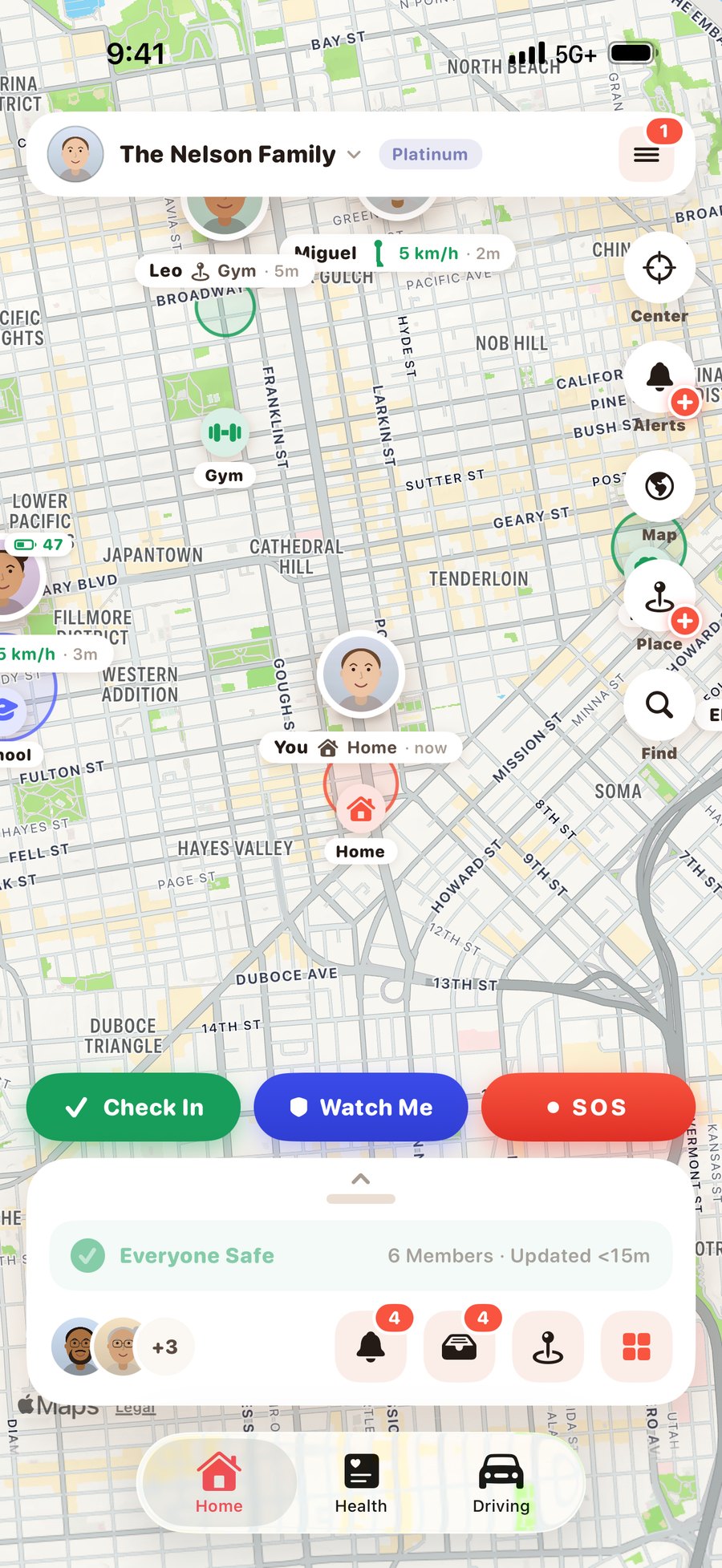
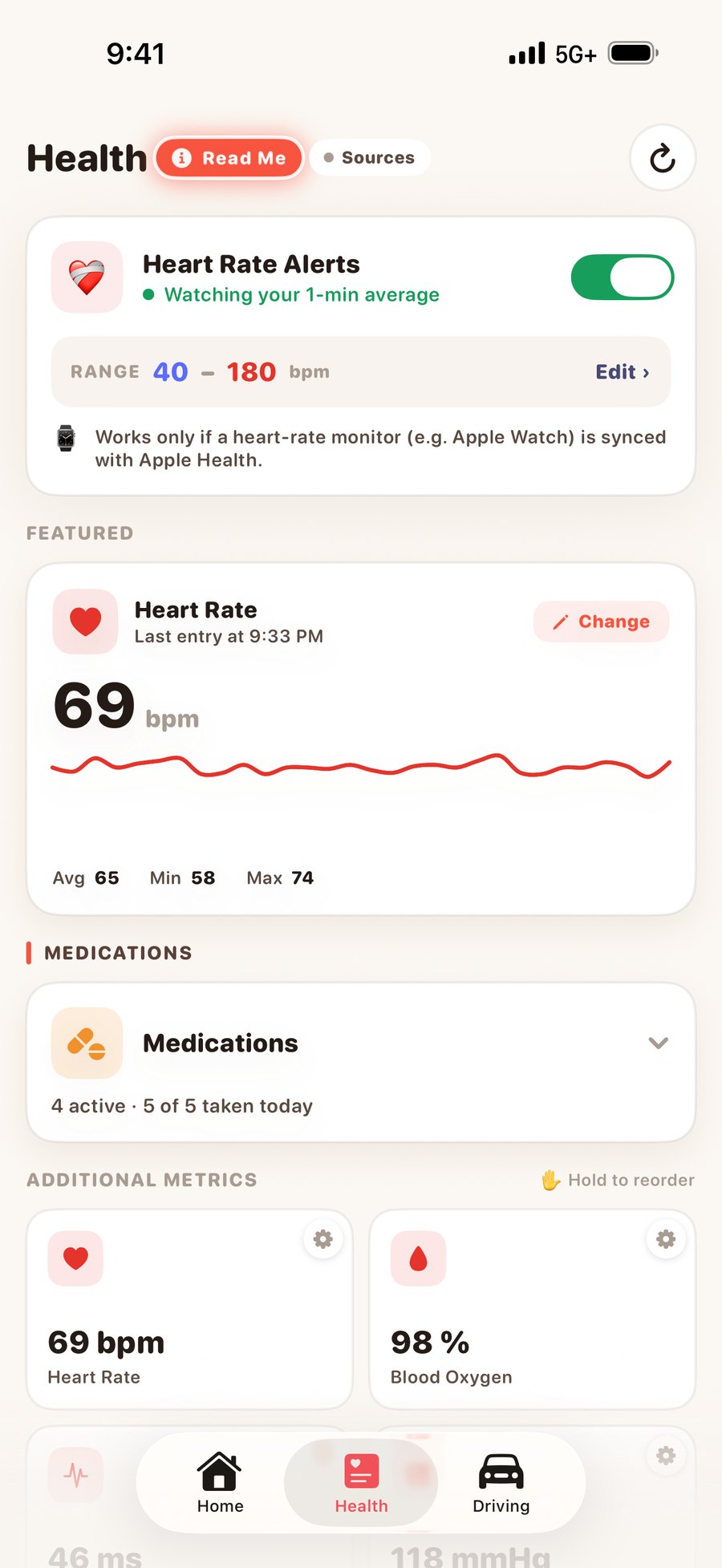
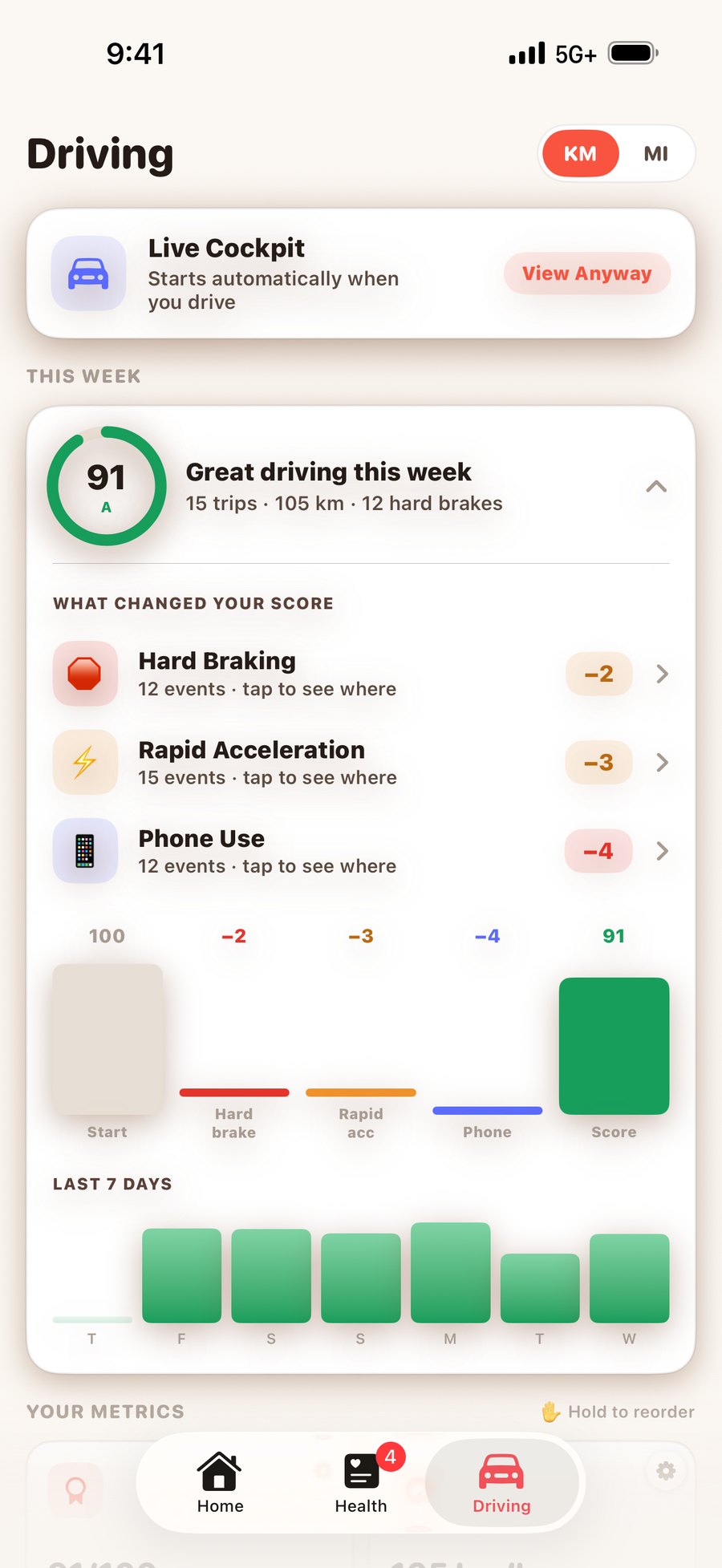
Orbit is a family safety app for iPhone. You create a private circle — we call it a Nest — and invite the people you actually worry about: an ageing parent, a new driver, a teenager, a partner who runs alone before it is light.
The app is three tabs. Home is the live map, with places, alerts and the SOS button. Health is vitals read from Apple Health and Apple Watch, with live heart rate and medications. Driving is trips detected automatically, scored, and replayable.
Nothing is switched on by joining. Driving, health, live location and live heart rate are four separate permissions, each granted by the person they belong to, per Nest and per person, and revocable in one tap.
Orbit runs on iPhone (iOS 16 or later) today, and the Android build is in testing now. The map, SOS, Watch Me, places and driving are the same on both, and a Nest will mix them freely. Apple Watch is optional and unlocks the health half: live heart rate and ECG stream from the watch on the wrist, which is why those two stay an iPhone-and-Watch feature on either platform.
Each one has its own page. Nothing here is explained twice.
One tap alerts the whole Nest. A room opens with an automatic briefing and their Medical ID. Then real texts and real calls go out to your contacts, until somebody answers.
A live heart rate streaming off an Apple Watch, ECG results, thirty-odd vitals with real history, a medication list, and alerts when a reading leaves the band you set.
Trips detected without anybody starting anything, scored on what actually predicts risk, with a live cockpit and full route replay.
Four sharing scopes, set per person and per Nest. Live tracking and live heart rate ask permission every single session and expire on their own.
Health metrics come from Apple Health. Orbit reads it, never writes to it — so the vitals available to you are whatever your iPhone, Apple Watch and any connected apps or devices already write into Apple Health.
Platinum free when they enter your code on a new account.
Platinum free, added automatically, for every 10 people who sign up with your code.
A push lands on a phone that is face-down and on silent at three in the morning. So Orbit does not stop there — it texts your emergency contacts, then rings them, one by one.
Life360 also reaches emergency contacts by phone — through a third-party dispatch centre, on its paid tiers, in five countries. Orbit calls your own people directly, to any number in any country, and lets you read the delivery log afterwards to see exactly who answered.
Comparison based on Life360's published SOS with 24/7 Emergency Dispatch documentation, August 2026.
The same chain fires after an uncancelled crash countdown, and after a sustained heart-rate breach that nobody acknowledges. You do not have to be conscious, or holding the phone.
Texts and voice calls are delivered through Twilio, so they reach the countries and networks Twilio serves. Coverage and local restrictions vary by destination — see Twilio's SMS coverage by country and voice coverage by country. Where a number cannot be reached by text or call, the push notification to your Nest still goes out — on every plan.
The moment it starts, Orbit builds the responders a briefing — before anybody has typed a word.
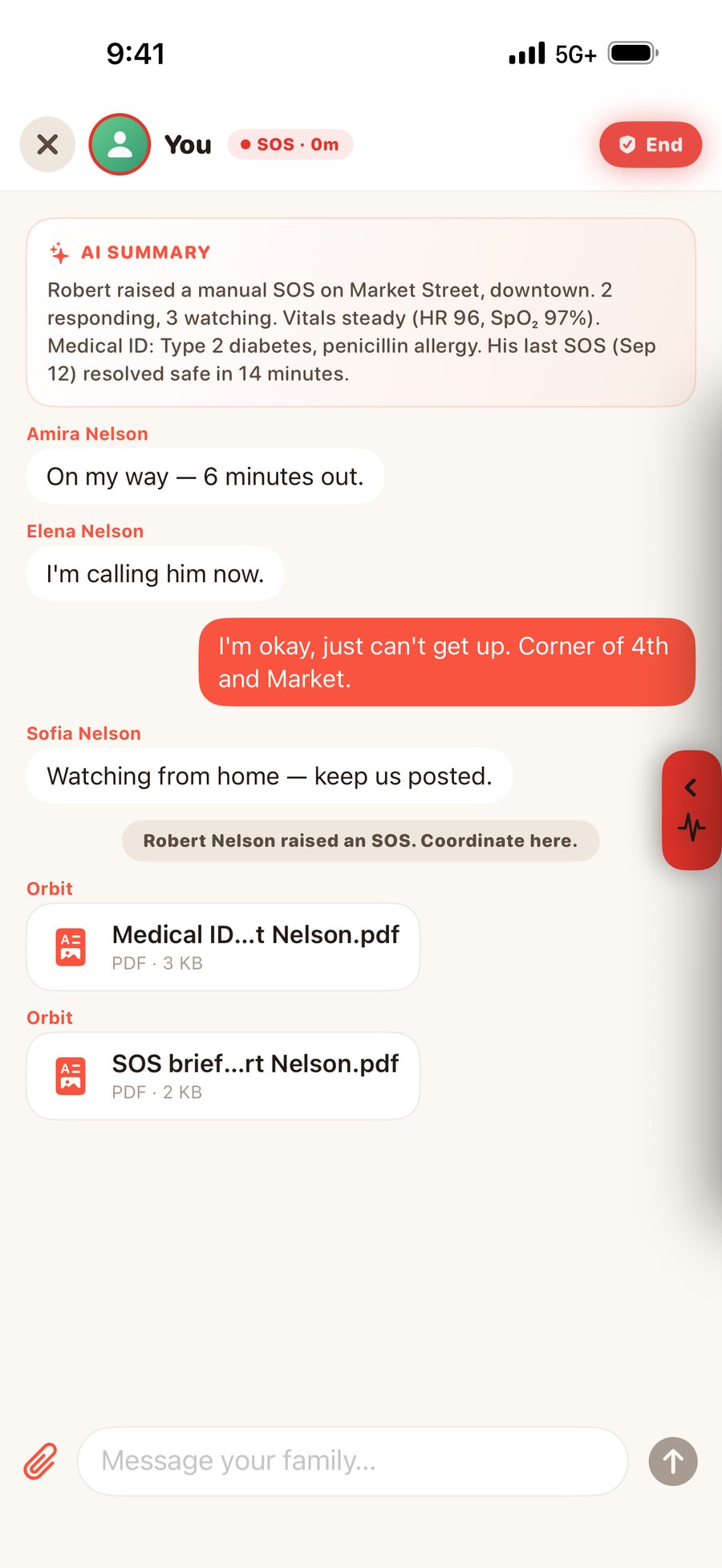
Orbit writes the summary line at the top itself — what happened, and when. Under it sits a live panel: incident type, who is responding, last known location, battery, and their latest heart rate, blood oxygen, blood pressure and glucose.
The walk from the station. The drive back late. The bit of the day you would rather not do unwatched — without asking anyone to sit and stare at a map.
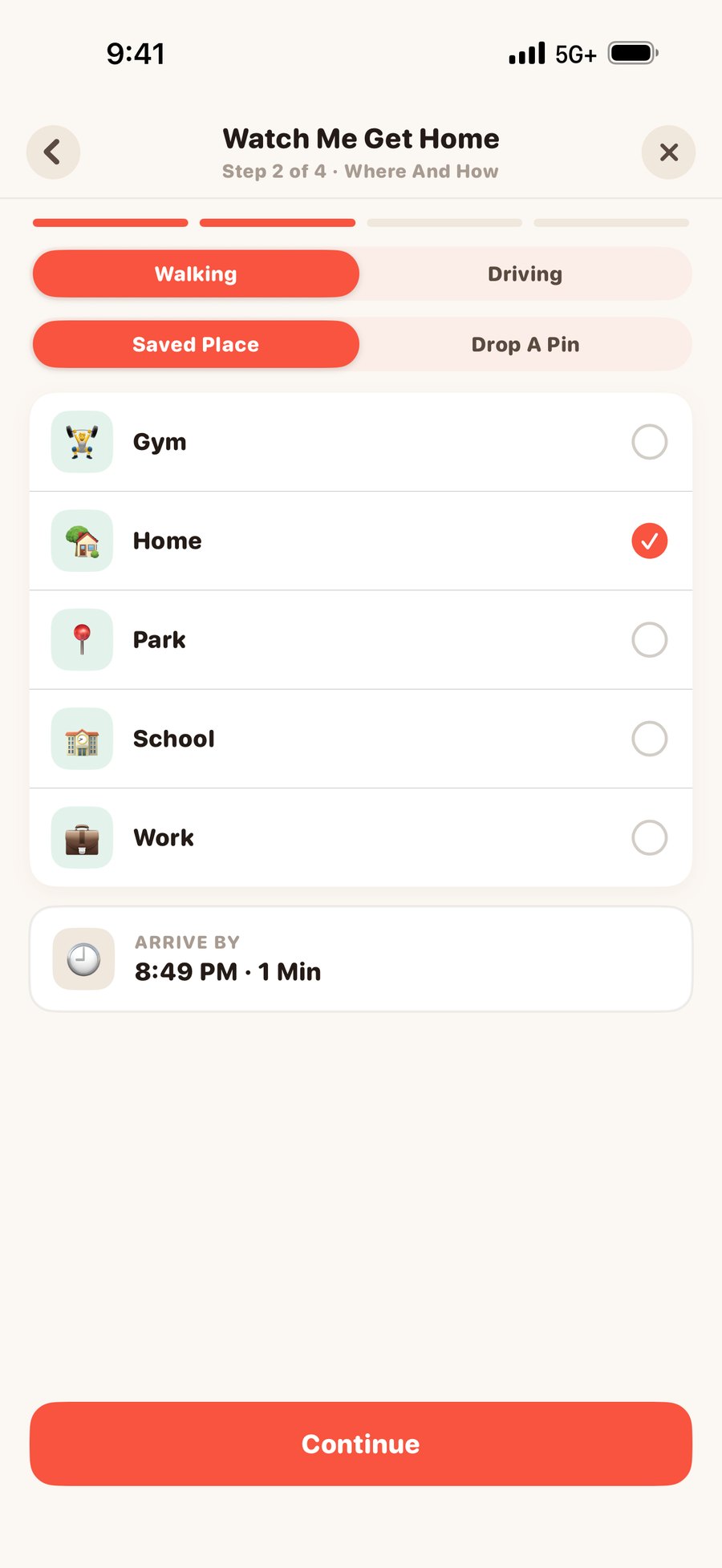
Pick a place or drop a pin, say whether you are walking or driving, and choose who may watch. Orbit works out the route and how long it should take. The people you picked can follow you along it; nobody else can.
It ends the moment you arrive, and everyone watching is told. No session left running, no location shared a minute longer than the trip.
Any of the three puts a thirty-second countdown on your screen with I'm OK on it. Tap it and nothing happens. Ignore it, and Orbit raises the alarm on your behalf — to the people you chose, with where you are and which of the three it was.
Watch Me alerts the family you picked. Orbit is not an emergency service and does not contact 911.
Four kinds of alert. You choose who each one watches, and exactly what counts — then Orbit watches so nobody has to sit and stare at a map.
Home, School, Work, the gym — anywhere you save. Watch arrivals, departures, or both, per person.
Over a limit you set, from 25 to 120 mph — and only if they hold it past the delay you pick, so one overtake is not an alarm.
Heart rate, blood oxygen, glucose or blood pressure outside a safe band — set from their age, or by you. A missed dose counts too.
Stops sharing, goes quiet for too long, brakes hard or accelerates hard — the ones nobody thinks to ask for until they need them.
An alert is set on people, not on a household. The list says who each one is watching, and anyone can see what is set on them — nobody is watched by surprise.
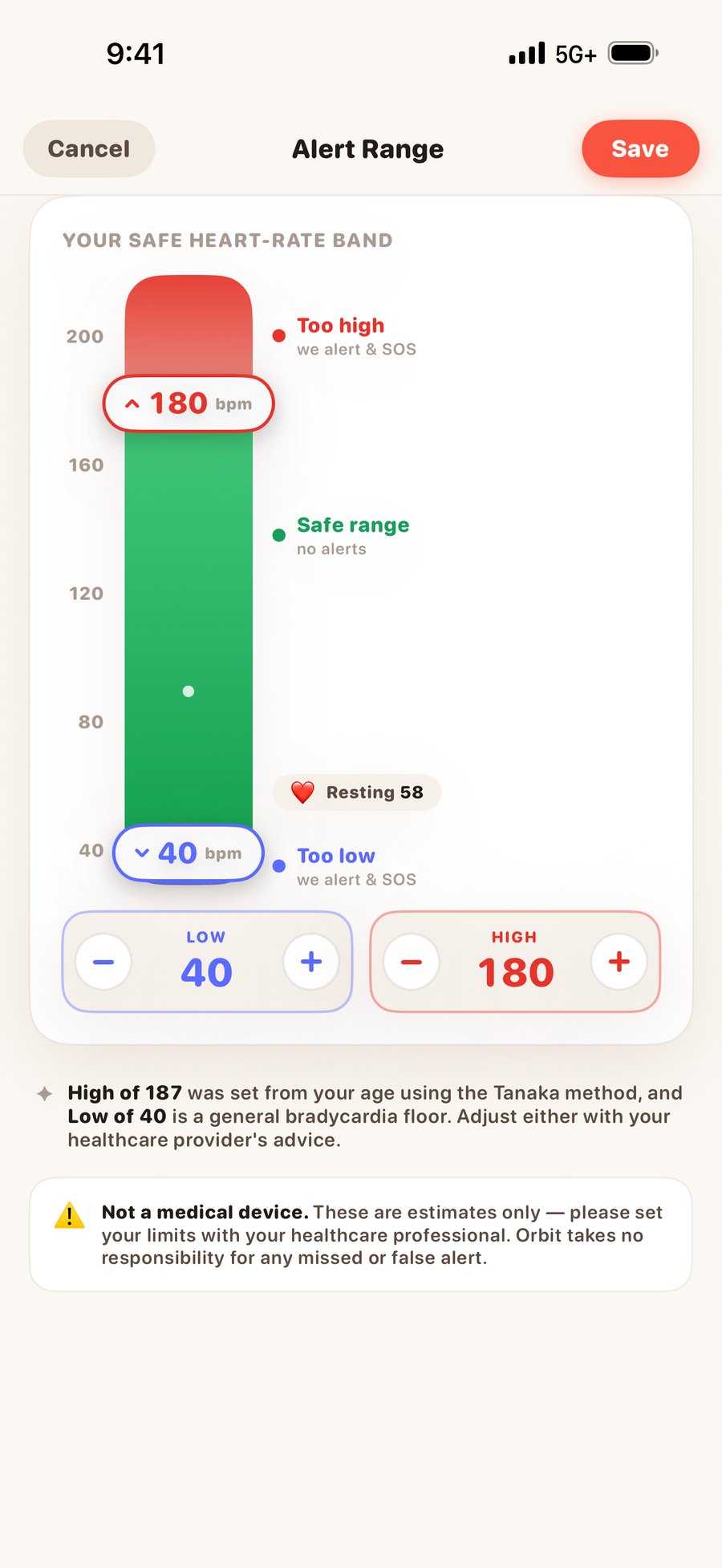
The safe band starts from their age and you move it. Orbit is not a medical device and says so on the screen where it matters.
Not a position from five minutes ago, and not a heart rate from this morning. Both need the other person's permission, every session.
Their pulse streams off their Apple Watch about once a second — a live number, a live trace, and the zone beside it. It needs a real watchOS app on the other wrist, which is why location-first family apps generally do not offer it.
A session, not a setting. Set a destination and follow the journey in real time; our server compares their actual path against the route and pushes you if they go materially off it, staying quiet through a normal reroute. It ends when either of you stops it, or after thirty minutes of no activity.
The same app, set up four different ways.
Live heart rate, vitals with real thresholds, an inactivity monitor, and an SOS that phones the family rather than buzzing them.
Every trip scored and replayable, a live cockpit, speeding alerts and crash detection — for a new driver or a daily commuter.
Arrive and leave alerts for school, a one-tap check-in, and Watch Over for a minor. Orbit reads no messages, photos or browsing.
Live tracking for the length of one run with deviation alerts, and a call chain that rings people if you cannot.
The sponsor pays; everyone else in the circle gets the plan free. New Nests start with a free 7-day Gold trial.
Prices read live from the App StoreThe whole safety floor — the map, the SOS and the emergency room.
Free, without the ads — and room to set things up properly.
Health and driving unlocked — where Orbit stops being a map.
Real time — and the only plan that phones people outside the app.
Payment is charged to your Apple ID. Subscriptions renew automatically unless cancelled at least 24 hours before the end of the current period. Manage or cancel in iOS Settings › your name › Subscriptions; refunds are handled by Apple. Prices are the current App Store prices for the country shown above, read from Apple. Downgrading never deletes anything: over-limit items go read-only and wake up if you upgrade again.
Yes — real voice calls and real SMS to the emergency contacts you chose, placed by our servers over a telephony network. When an SOS fires we text every contact in parallel, then ring the call list one number at a time. If a call is unanswered, busy, or answered by voicemail, we escalate to the next number.
Every attempt is recorded, and Menu › Safety › SOS Call & Text Delivery Status shows you who was reached and who was not. This runs on Platinum, and it runs the same way after an uncancelled crash countdown and a sustained heart-rate breach. Orbit does not contact emergency services.
Not yet — Orbit is on iPhone today and the Android build is in testing. When it lands, a Nest will mix the two freely: one of you on an iPhone and one on a Pixel will see the same map, get the same SOS and watch each other home. Health comes from Apple Health on iPhone and Health Connect on Android. The two live heart-rate features need an Apple Watch on the wrist being measured, because that is the only way to stream a pulse second by second — so those stay Apple-Watch features whichever phone you carry.
No. Orbit is not a medical device and does not contact emergency services. An SOS notifies the people in your Nest and then texts and calls the emergency contacts you chose. In a real emergency, call your local emergency number first — then use Orbit to bring your family in. Orbit should never be relied on as your only means of getting help.
No. Joining a Nest switches nothing on. Driving, health, live location and live heart rate are four separate scopes, each granted by the person they belong to, per Nest and per person, and revocable in one tap from Manage Access.
Live tracking and live heart rate never get a standing grant: each attempt sends a request the other person must allow, and the session expires on its own. The only exceptions are an active SOS and accounts marked as minors, which are visible to the circle by design and stated in the app.
The moment an SOS opens, Orbit posts an AI-written summary of what is happening, the person's Medical ID (blood type, allergies, conditions, medications, organ-donor status), and a PDF containing the full conversations from their last five emergencies. Their vitals and medication list sit alongside. Responders can mark themselves as watching or responding, and one tap marks the person safe and ends it for everybody.
Orbit does not sell or share your personal data with third parties for their own purposes. There is no data broker, no partner feed and no research programme, and there is no advertising built on your health or location — free-plan ads are non-personalised. On iPhone no advertising identifier is requested at all; on Android the ads SDK uses the device advertising ID only to cap repeats and prevent fraud, never joined to your health or location. Health data is read from Apple Health or Health Connect, never written back, and never used for advertising.
Menu › Privacy & Terms › Download My Data gives you a PDF of everything held for your account. Delete Account erases it. See the full Privacy Policy.
Up to 25 members, on every plan including Free — family size is not something we charge for. One person can belong to up to ten Nests at once and switch between them from the top of the Home screen.
Less than you would expect. Orbit does not stream GPS continuously — the motion coprocessor senses activity cheaply, and location is sampled on a schedule and when your state actually changes. Everyone idles at a five-minute floor, so a phone on a desk costs almost nothing.
A push notification lands on a silenced phone at 3am. Here is what we do instead — and the detail nobody notices working.
The most common email we get asks about Android. What we are building, what is holding it up, and why we will not give you a date.
Most family apps put the emergency features on the top tier. We wrote a rule that stops us doing the same.
Download Orbit, create a Nest, invite one person. The safety floor is free forever, and you can decide about a plan later.
Get Orbit On The App StoreFree to download · iPhone & Apple Watch · iOS 16+